使用 LoRA/DoRA 微调 NVIDIA Cosmos Predict 2.5 生成机器人视频
Fine-Tuning NVIDIA Cosmos Predict 2.5 with LoRA/DoRA for Robot Video Generation
NVIDIA 团队(Miguel Martin、Jonathan Allen、Ke Ding、Pooya Jannaty 等)使用 LoRA 和 DoRA 对 Cosmos Predict 2.5(2B 参数世界模型)进行参数高效微调,适配机器人操作视频生成。训练使用 GR1-100 数据集(92 个机器人操作视频),在 8× H100 上约 2.5 小时完成 100 个 epoch。微调后,时间 Sampson 误差和跨视角 Sampson 误差下降,物理合理性与指令遵循评分提升。LoRA rank=32 与 DoRA rank=32 性能相近,rank=8 在几何一致性上已足够。
](https://huggingface.co/ting-yunc)


动机
NVIDIA Cosmos Predict 2.5 是一个大规模世界模型,能够根据文本、图像或视频片段生成物理上合理的视频。为了将其适配到特定领域,例如机器人操作或特定相机视角,团队仍需进行针对性微调。
训练机器人策略需要演示数据,但收集真实机器人轨迹既慢又昂贵。使用微调后的视频世界模型生成合成轨迹提供了一种可扩展的替代方案。然而,对 2B 参数模型进行全量微调成本高昂,且存在灾难性遗忘通用知识的风险。LoRA 和 DoRA 将小型可训练适配器模块注入冻结的基础模型中,降低了内存需求,同时保持适配器文件小巧且可移植。这使得在单 GPU 上进行微调变得可行,并能在推理时灵活地为不同领域切换适配器。
本指南将介绍如何使用 LoRA 和 DoRA 对 Cosmos Predict 2.5 进行参数高效微调,利用 diffusers 和 accelerate 库,支持单 GPU 和多 GPU 训练。然后,我们将展示如何使用微调后的模型为下游机器人学习任务生成合成机器人轨迹。
要求
- Python 3.10+
- 带 CUDA 的 PyTorch 2.5+
diffusers(会自动拉取transformers和peft)、accelerate- 可选:安装
wandb以监控训练 - 单 GPU 训练至少需要一块 80 GB 的 GPU;建议使用 8× H100 以加快迭代速度
在您的机器上安装依赖项:
pip install -U "diffusers[torch]" transformers accelerate peft wandb
准备数据
安装 diffusers 后,导航至 examples/cosmos 以查看示例代码。
我们使用与 GR00T Dreams 后训练配方相同的数据集:
使用 download_and_preprocess_datasets.sh 下载并预处理训练和测试数据集:
bash download_and_preprocess_datasets.sh
生成的训练数据集文件夹结构如下:
gr1_dataset/train
├── metas/
│   └── *.txt
├── videos/
│   └── *.mp4
└── metadata.csv
评估数据集是一个扁平目录,包含配对的 .txt 和 .png 文件,用于 (prompt, image) 对:
gr1_dataset/test
├── filename1.txt
├── filename1.png
├── filename2.txt
├── filename2.png
└── ...
训练
在本节中,我们将逐步介绍 train_cosmos_predict25_lora.py 中的实现。
VideoDataset
VideoDataset 从 args.train_data_dir(在我们的示例中为 gr1_dataset/train)加载每个样本作为 (caption, video) 对。对于长度超过 args.num_frames 的视频,它会在每个 epoch 随机采样一个连续的 args.num_frames 窗口,从而实现时间增强。在内部,diffusers.video_processor 中的 VideoProcessor 将原始帧调整大小并归一化为形状为 (channels, frames, height, width) 的张量。
train_dataset = VideoDataset(
    dataset_dir=args.train_data_dir,
    num_frames=args.num_frames,
    video_size=[args.height, args.width],
)
初始化适配器
Cosmos Predict 2.5 由三个子模块组成:
- 一个 VAE,用于将视频编码为潜在表示
- 一个文本编码器,用于将文本 prompt 编码为 prompt 嵌入
- 用于在潜在空间中进行扩散的 DiT
在训练期间,所有 VAE、文本编码器和 DiT 权重均被冻结。LoRA 适配器被注入到 DiT 的注意力投影层(to_q、to_k、to_v、to_out.0)和前馈层(ff.net.0.proj、ff.net.2)中。然后,可训练的 LoRA 参数会被提升为 float32,以在 bf16 混合精度下保持数值稳定性。
from diffusers import Cosmos2_5_PredictBasePipeline
from peft import LoraConfig

pipe = Cosmos2_5_PredictBasePipeline.from_pretrained(
    "nvidia/Cosmos-Predict2.5-2B",
    revision="diffusers/base/post-trained",
    torch_dtype=torch.bfloat16,
)

# 冻结所有基础权重
dit = pipe.transformer
vae = pipe.vae
text_encoder = pipe.text_encoder

dit.requires_grad_(False)
vae.requires_grad_(False)
text_encoder.requires_grad_(False)

lora_config = LoraConfig(
    r=args.lora_rank,
    lora_alpha=args.lora_alpha,
    target_modules=['to_q', 'to_k', 'to_v', 'to_out.0', 'ff.net.0.proj', 'ff.net.2'],
    use_dora=args.use_dora,  # 设置为 True 以切换到 DoRA
)
dit.add_adapter(lora_config)
cast_training_params(dit, dtype=torch.float32)  # LoRA 参数使用 fp32
传递 use_dora=True 会切换到 DoRA,它在应用低秩更新之前将每个权重分解为幅度和方向。训练循环无需其他更改。
损失函数
Cosmos Predict 2.5 使用整流流:模型被训练来预测将噪声样本线性传输到原始“干净”数据的速度。具体来说,在时间步 t,在采样的噪声水平 σt 下构建一个噪声插值 xt = σt·noise + (1−σt)·clean,模型通过均方误差(MSE loss)学习预测目标速度 noise − clean。视频的前两帧用作条件,因此它们的潜在表示不添加噪声。
训练损失遵循 Cosmos Predict 2.5 使用的整流流公式:
# 使用 logit-normal 分布采样时间步
sigma_t = sample_train_sigma_t(bsz, distribution='logitnormal', device=device)

# 整流流在干净潜在表示和噪声之间插值
xt = noise * sigma_t + clean_latent * (1 - sigma_t)

# 条件生成:DiT 以视频的前两帧、时间步和 prompt 嵌入为条件
# `cond_indicator` 和 `cond_mask` 在前两帧的值为 1,在其他帧的值为 0
xt = clean_latent * cond_mask + xt * (1 - cond_mask)
in_timestep = cond_indicator * 0.0001 + (1 - cond_indicator) * sigma_t

# 前向传播
pred_velocity = dit(
                    hidden_states=xt,
                    condition_mask=cond_mask,
                    timestep=in_timestep,
                    encoder_hidden_states=prompt_embeds,
                    padding_mask=padding_mask,
                    return_dict=False,
                )[0]

# MSE 损失仅计算在非条件帧上
target_velocity = noise - clean_latent
pred_velocity = target_velocity * cond_mask + pred_velocity * (1 - cond_mask)
loss = F.mse_loss(pred_velocity.float(), target_velocity.float())
优化器和调度器
我们使用 torch.optim.AdamW 作为优化器,并使用来自 diffusers.optimization 的 get_linear_schedule_with_warmup 作为调度器。调度器在 scheduler_warm_up_steps 步内线性预热学习率,在 scheduler_f_max × learning_rate 处达到峰值,然后在剩余的 num_training_steps 步内线性衰减至 scheduler_f_min × learning_rate。
lora_params = [p for p in dit.parameters() if p.requires_grad]

optimizer = torch.optim.AdamW(lora_params, lr=args.learning_rate, weight_decay=args.weight_decay)
lr_scheduler = get_linear_schedule_with_warmup(
    optimizer,
    num_warmup_steps=args.scheduler_warm_up_steps,
    num_training_steps=args.num_training_steps,
    f_min=args.scheduler_f_min,
    f_max=args.scheduler_f_max,
)
检查点保存
LoRA 权重每 args.checkpointing_epochs 个 epoch 以 diffusers 格式保存一次:
if (epoch+1) % args.checkpointing_epochs == 0:
    if accelerator.is_main_process:
        save_path = os.path.join(args.output_dir, f"checkpoint-{epoch}")
        accelerator.save_state(save_path)
accelerator.save_state() 会在 save_path 写入一个 pytorch_lora_weights.safetensors 文件,该文件是您在推理时传递给 pipeline 的适配器文件。
训练命令
使用提供的 shell 脚本作为起点:
export MODEL_NAME="nvidia/Cosmos-Predict2.5-2B"
export DATA_DIR="gr1_dataset/train"
export OUT_DIR=YOUR_OUTPUT_DIR
lora_rank=32

accelerate launch --mixed_precision="bf16" train_cosmos_predict25_lora.py \
  --pretrained_model_name_or_path=$MODEL_NAME \
  --revision diffusers/base/post-trained \
  --train_data_dir=$DATA_DIR \
  --train_batch_size=1 \
  --num_train_epochs=500 \
  --checkpointing_epochs=100 \
  --seed=0 \
  --output_dir=$OUT_DIR \
  --report_to=wandb \
  --height 432 --width 768 \
  --allow_tf32 --gradient_checkpointing \
  --lora_rank $lora_rank --lora_alpha $lora_rank
lora_rank 控制低秩分解的秩。更高的秩意味着更多的可训练参数和更强的表达能力,但代价是更高的内存和更大的适配器文件。我们以 rank=32 作为起点,产生约 5000 万个可训练参数。
lora_alpha 是应用于 LoRA 更新的缩放因子:权重增量在添加到冻结的基础权重之前会乘以 lora_alpha / lora_rank。将 lora_alpha = lora_rank(如此处所示)可将此缩放因子保持在 1.0,因此 LoRA 更新以全强度应用,无需任何额外衰减。
要使用 DoRA 而不是 LoRA,请在命令中添加 --use_dora。
对于多 GPU 训练,accelerate 会自动处理分布。根据经验,我们发现对该任务训练 100 个 epoch 即可获得不错的结果,在单个 H100 上需要 17 小时,在 8 个 H100 GPU 上需要 2.5 小时。
使用您的 LoRA 运行推理
训练完成后,使用 eval_cosmos_predict25_lora.py 从评估数据集生成视频。该脚本从 gr1_dataset/test 读取配对的 .png 和 .txt 文件,为每个文件生成一个视频,并将 .mp4 文件写入 --output_dir。
ImageDataset
ImageDataset 将 .txt 文件读取为 prompt 字符串,并使用 diffusers.utils 中的 load_image 将 .png 加载为 PIL.Image.Image:
def __getitem__(self, idx):
    img_path, txt_path, stem = self.samples[idx]
    image = load_image(img_path)
    with open(txt_path) as f:
        prompt = f.read().strip()
    return {"image": image, "prompt": prompt, "stem": stem}
加载 Pipeline 和 LoRA/DoRA 权重
from diffusers import Cosmos2_5_PredictBasePipeline

pipe = Cosmos2_5_PredictBasePipeline.from_pretrained(
    "nvidia/Cosmos-Predict2.5-2B",
    revision="diffusers/base/post-trained",
    device_map="cuda",
    torch_dtype=torch.bfloat16,
)

pipe.load_lora_weights("/path/to/lora/checkpoint")
pipe.fuse_lora(lora_scale=1.0)
fuse_lora 将适配器权重合并到基础模型中,消除了 LoRA/DoRA 分解带来的任何推理开销。
生成初始潜在噪声
为了确保可复现性,arch_invariant_rand 函数通过 NumPy 生成初始潜在噪声,使噪声不受 GPU 架构影响。如果可复现性不是问题,用户无需向 pipeline 提供输入噪声。
# 生成从与潜在表示形状相同的随机噪声开始
latent_shape = pipe.get_latent_shape_cthw(args.height, args.width, args.num_output_frames)
noises = arch_invariant_rand(
    (args.batch_size, *latent_shape), dtype=torch.float32, device=args.device, seed=args.seed
)

frames = pipe(
    image=image,           # PIL Image:作为条件的第一帧
    prompt=prompt,
    num_frames=args.num_output_frames,
    num_inference_steps=args.num_steps,
    height=args.height,
    width=args.width,
    latents=noises,        # 可选
).frames[0]

export_to_video(frames, "output.mp4", fps=16)
推理命令
export LORA_DIR=YOUR_ADAPTER_DIR
export DATA_DIR="gr1_dataset/test"
export OUT_DIR=YOUR_EVAL_OUTPUT_DIR

python eval_cosmos_predict25_lora.py \
  --data_dir $DATA_DIR \
  --output_dir $OUT_DIR \
  --lora_dir $LORA_DIR \
  --height 432 --width 768 \
  --num_output_frames 93 \
  --num_steps 36 \
  --seed 0
要评估没有 LoRA 的基础模型,请省略 --lora_dir。
评估指标
Sampson 误差
Sampson 误差是一种几何误差度量,用于测量匹配的关键点到其对应极线的距离。在生成视频的上下文中,较低的 Sampson 误差意味着帧间(或相机视角间)的运动在几何上是一致的。较高的值表示抖动、幻觉运动或多视角不一致。
我们遵循 Cosmos Predict 评估指南,使用两个指标评估生成视频的几何质量:
- 时间 Sampson 误差:在单个相机视角内的连续帧之间计算,衡量时间稳定性。
- 跨视角 Sampson 误差:在不同相机视角的同步帧之间计算,衡量多视角几何对齐。
LLM 作为评判者
我们使用 Cosmos Reason2 作为 LLM 评判者,对每个示例从 1 到 5 进行评分。我们设计了两个评分标准:
- 物理合理性(video_physics.yaml):评判者评估视频是否遵循物理常识,而不查看文本 prompt。
- 指令遵循(video_IF.yaml):评判者同时接收 prompt 和视频作为输入,并评估描述的任务是否被正确完成。
video_physics.yaml
system_prompt: "You are a helpful assistant."
user_prompt: |
  You are a helpful video analyzer. Evaluate whether the video follows physical commonsense.

  Evaluation Criteria:
  1. **Object Behavior:** Do objects behave according to their expected physical properties (e.g., rigid objects do not deform unnaturally, fluids flow naturally)?
  2. **Motion and Forces:** Are motions and forces depicted in the video consistent with real-world physics (e.g., gravity, inertia, conservation of momentum)?
  3. **Interactions:** Do objects interact with each other and their environment in a plausible manner (e.g., no unnatural penetration, appropriate reactions on impact)?
  4. **Consistency Over Time:** Does the video maintain consistency across frames without abrupt, unexplainable changes in object behavior or motion?

  Instructions for Scoring:
  - **1:** No adherence to physical commonsense. The video contains numerous violations of fundamental physical laws.
  - **2:** Poor adherence. Some elements follow physics, but major violations are present.
  - **3:** Moderate adherence. The video follows physics for the most part but contains noticeable inconsistencies.
  - **4:** Good adherence. Most elements in the video follow physical laws, with only minor issues.
  - **5:** Perfect adherence. The video demonstrates a strong understanding of physical commonsense with no violations.

  Does this video adhere to the physical laws?
video_IF.yaml
system_prompt: "You are a helpful assistant."
user_prompt: |
  You are a helpful video analyzer. Evaluate whether the video follows the given instruction.

  Instruction: {instruction}

  Evaluation Criteria:
  1. **Task Completion:** Does the video show the task described in the instruction being completed?
  2. **Action Accuracy:** Are the actions performed in the video consistent with what the instruction specifies?
  3. **Object Interaction:** Does the robot or agent interact with the correct objects as described in the instruction?
  4. **Goal Achievement:** Is the final state of the video consistent with the expected outcome of the instruction?
  5. **Correct Hand Usage:** Does the video show the correct hand performing the action?

  Instructions for Scoring:
  - **1:** No adherence to the instruction. The video shows actions completely unrelated to the instruction.
  - **2:** Poor adherence. Some elements match the instruction, but major deviations are present.
  - **3:** Moderate adherence. The video follows the instruction for the most part but contains noticeable deviations.
  - **4:** Good adherence. Most elements in the video match the instruction, with only minor issues.
  - **5:** Perfect adherence. The video fully follows the instruction with no deviations.

  Does this video follow the instruction?
结果
定性分析
我们比较了基础模型(微调前)、LoRA 和 DoRA 在测试集前两个示例上生成的视频。
Prompt: Use the left hand to pick up dark green cucumber from on circular gray mat to above beige bowl.
| 训练前 | LoRA r=32 | DoRA r=32 |
|---|---|---|
| Video 13 | Video 14 | Video 15 |
Prompt: Use the right hand to pick up orange juice carton from center of pink plate to center of green bowl.
| 训练前 | LoRA r=32 | DoRA r=32 |
|---|---|---|
| Video 16 | Video 17 | Video 18 |
在微调之前,基础模型在几个方面表现不佳:机器人手部超出分布,导致模型在后续帧中幻觉出人类手部;它不能可靠地使用 prompt 中指定的正确手部;生成的视频表现出明显的抖动。使用 LoRA 和 DoRA 进行微调解决了所有这三个问题。
定量分析
我们在不同设置下微调了四个适配器:秩为 8 和 32 的 LoRA 和 DoRA。对于每个测试示例,我们使用不同的种子生成 5 个视频,并使用评估指标部分介绍的三个指标报告所有种子的平均分数。
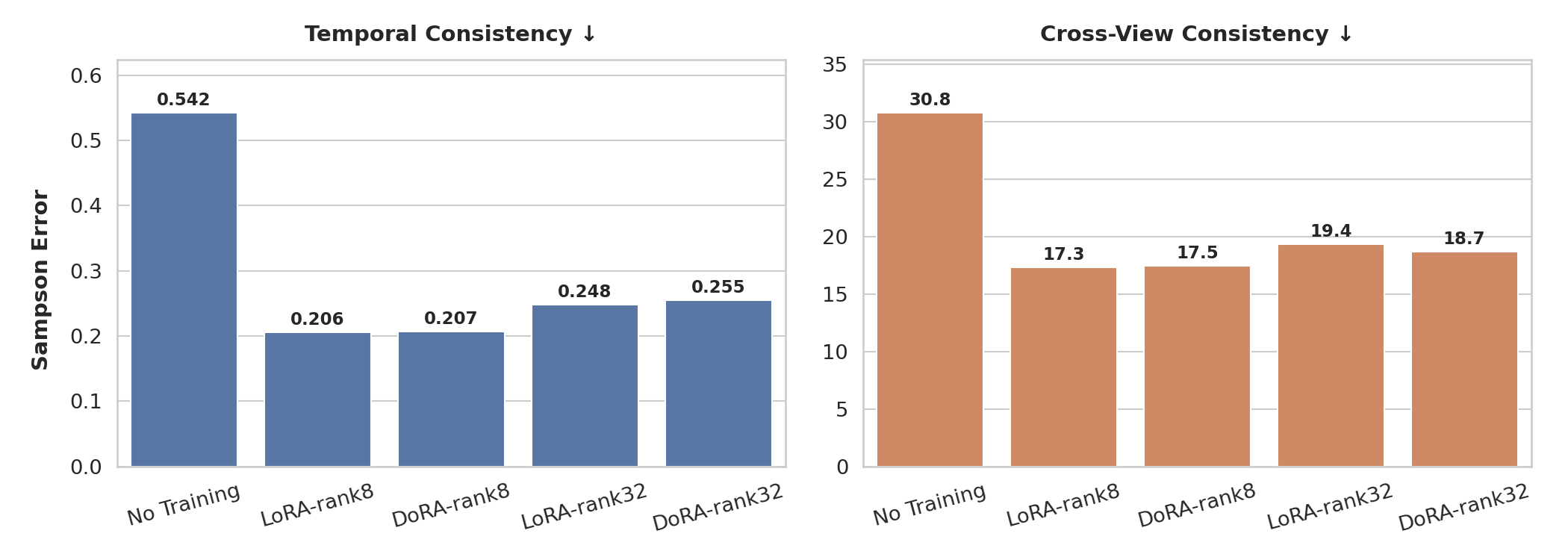
Sampson 误差(越低越好)。微调后,时间 Sampson 误差和跨视角 Sampson 误差均有所下降,表明时间稳定性和多视角几何一致性得到改善。
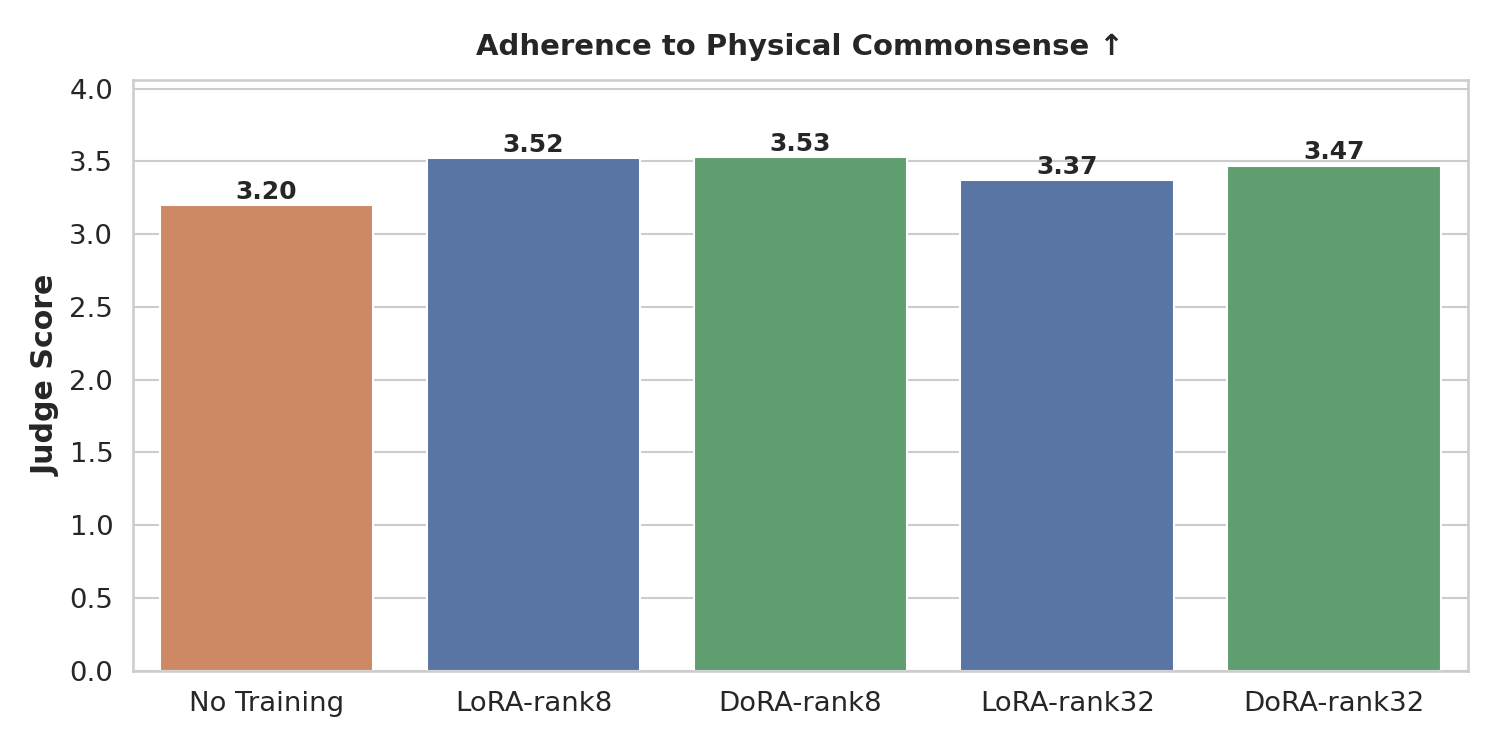
物理合理性分数(越高越好)。与基础模型相比,微调后的模型生成的视频更好地遵循物理常识。
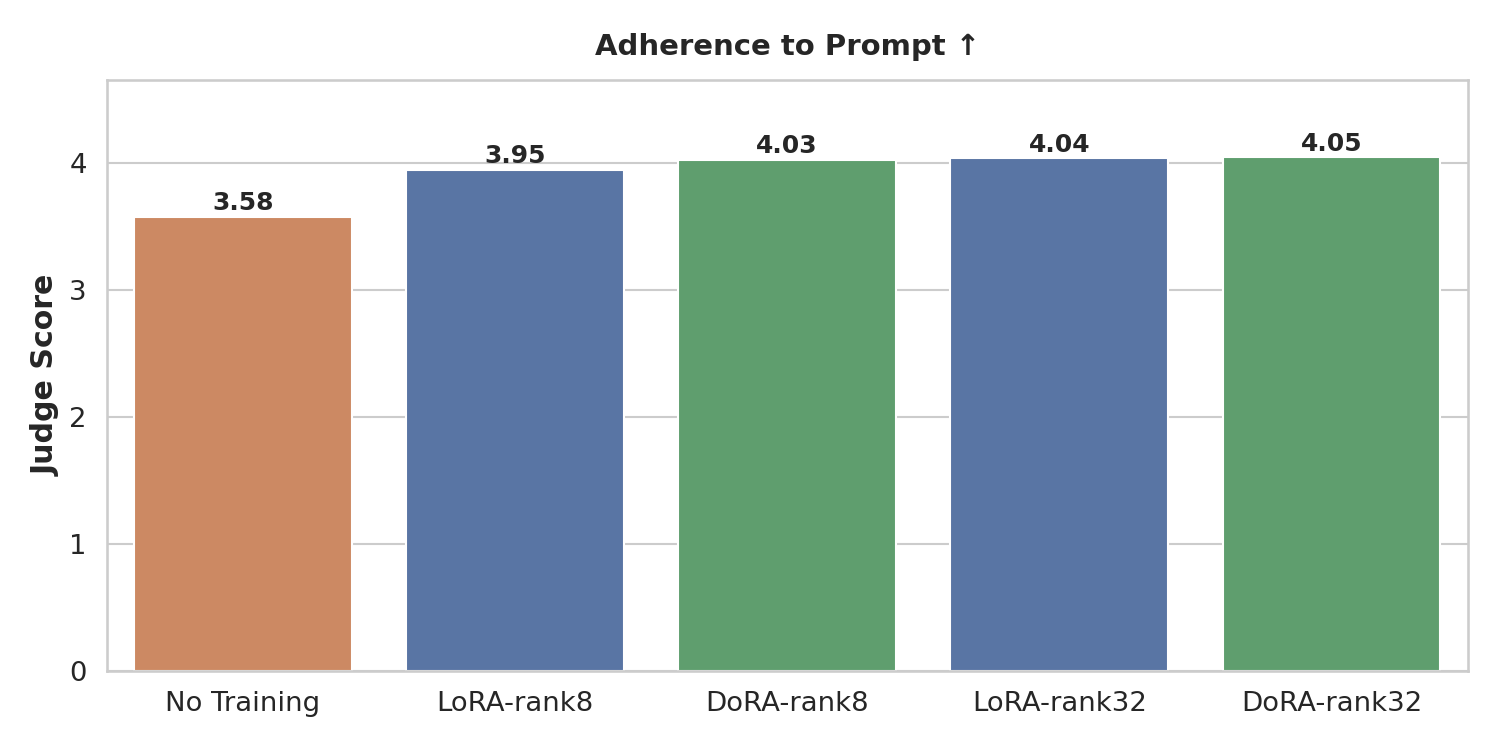
指令遵循分数(越高越好)。微调后的模型更可靠地完成 prompt 中描述的任务,包括使用正确的手部以及与指定对象交互。
结论:训练 100 个 epoch(在 8× H100 上约 2.5 小时)已足以显著改善所有三个指标。LoRA 和 DoRA 都收敛到相似的性能,证实了 DoRA 中额外的幅度-方向分解不会造成损害,并且在非常低的秩下可能有所帮助,但在此处并非必需。
更大的秩(32 对 8)提升了指令遵循能力(模型有更多容量来精确学习使用哪只手以及与哪些对象交互),但并未改善几何一致性或物理合理性。我们假设这是因为几何和物理先验主要由世界模型的冻结权重捕获;LoRA 适配器只需要将分布向域内机器人外观和任务结构偏移,这在秩为 8 时即可实现。
何时使用 DoRA 与 LoRA:如果内存非常紧张或适配器文件大小很重要,请从 LoRA r=8 开始。如果您有预算并观察到 LoRA 在低秩下训练不稳定,DoRA r=32 是一个合理的替代方案,因为幅度-方向分解有助于稳定学习。
- 访问我们的 Cosmos Cookbook 获取构建、适配和部署 Cosmos WFM 的分步工作流、技术配方和具体示例。
- 在 Hugging Face 和 GitHub 上探索新的开放 Cosmos 模型和数据集,或在 build.nvidia.com 上尝试模型。
- 加入社区,加入我们的 Cosmos Discord 频道。
- 已经在使用 Cosmos?了解更多关于如何贡献的信息。