如何在 AI Agents 中正确使用 MCP servers
How to correctly use MCP servers with your AI Agents
Philipp Schmid 在 2026 年 4 月文章中说明 AI Agents 使用 MCP servers 的两种模式:通过 `@mention` 按需解析并注入 tool schemas,以及在 subagent 配置中声明 MCP servers,并用 `allowed_tools` 限定可用工具范围,以控制 context 和 tool surface。
如何在 AI Agents 中正确使用 MCP servers
Philschmid](https://www.philschmid.de/)
搜索⌘k
如何在 AI Agents 中正确使用 MCP servers
April 27, 2026 3 分钟阅读
MCP servers 并没有过时。但盲目启用它们会让你的 context 膨胀,导致成本更高、性能更差。与 Agent Skills 不同,MCP servers 默认不具备渐进式披露(progressive disclosure)。你需要自行选择当前任务所需的 tools。下面是两种经过验证的模式,说明如何正确使用 MCP servers 并避免膨胀。
1. 显式 MCP Servers:Inline Tool Injection
MCP servers 保持 opt-in。Servers 通过 prompt 中的 @mention 被引用,agent 会在 model request 之前解析、获取并注入 tools。
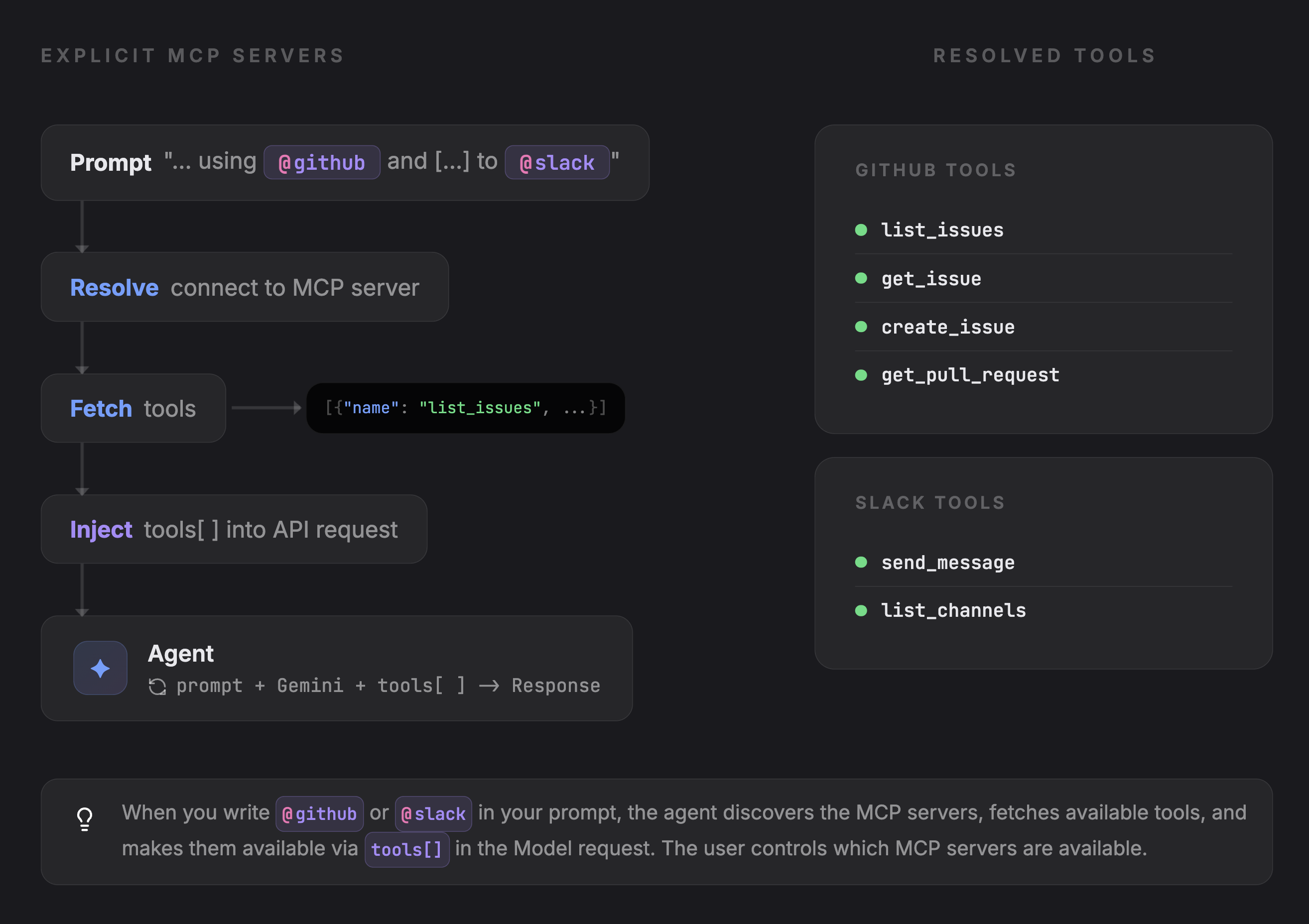
在 prompt 中写入 @github 或 @slack 会触发 agent 执行以下操作:
- 将
@mention解析为已注册的 MCP server URL - 从 server 获取 tool schemas
- 将它们注入到 API request 的
tools[]数组中 - 将所有内容转发给 model,由 model 决定调用什么
除非被请求,否则不会加载任何内容。tool surface 会保持较小。
// Pseudo-code
async function handlePrompt(prompt: string) {
  // Detect @mentions in the prompt
  const mentions = parseMentions(prompt); // ["@github", "@slack"]

  // Resolve each mention to an MCP server
  const servers = mentions.map(m => mcpServers.resolve(m));

  // Fetch tool schemas from each server
  const mcpTools = await Promise.all(
    servers.map(s => s.listTools())
  );

  // Inject into the API request alongside native tools
  const response = await llmCall({
    prompt,
    tools: [...nativeTools, ...mcpTools],
  });

  // handle response, call tools, etc ...
}
何时使用: MCP 使用是偶发且由用户驱动的。有人提出一个需要 Slack 或 GitHub 数据的问题,他们 @mention 对应 server,它就只会在这次 request 中被拉取进来。这样可以保持较低成本,并避免在不需要外部 integrations 的任务中引入 tool 噪声。
2. Subagent MCP Servers
MCP servers 在 subagents definition 中声明,并在 runtime 自动可用,与 read_file 或 run_command 等 native tools 一起使用。
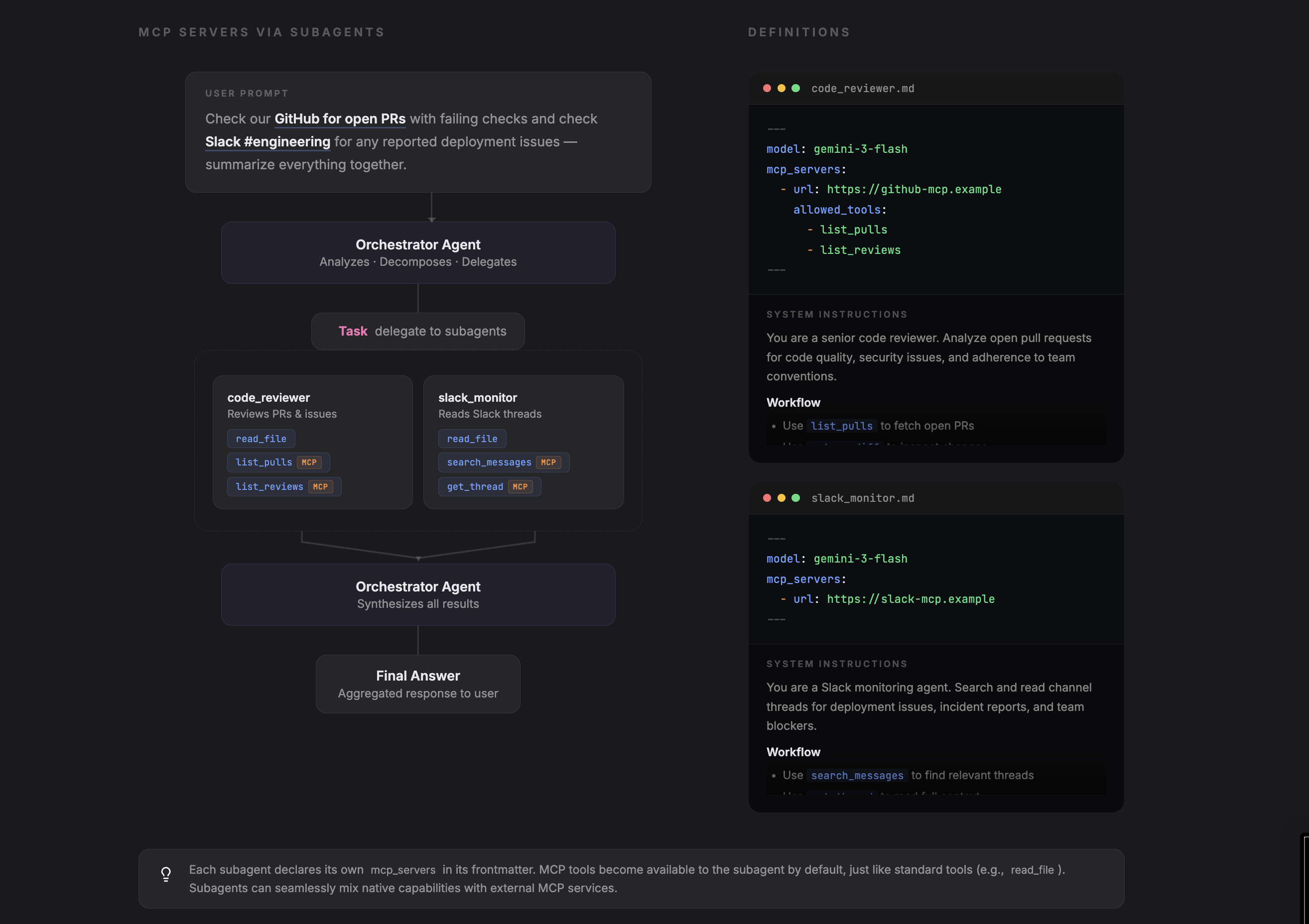
每个 subagent 都有自己的 configuration,用来声明其 model、tools……以及可选的 MCP servers。你可以使用 allowed_tools 将 MCP servers 限定到特定 tools。
# Pseudo-code: code_reviewer.md
---
name: code-reviewer
model: gemini-3-flash
mcp_servers:
  - url: https://github-mcp.example
    allowed_tools:
      - list_pulls
      - list_reviews
      - get_diff
---
You are a code reviewer. Review open PRs...
main agent 会注册 subagents。被调用时,每个 subagent 会连接到其声明的 MCP servers,并将这些 tools 与 native tools 合并。
// Pseudo-code

// Register subagents as tools for the orchestrator
const codeReviewer = createSubagent("./agents/code_reviewer.md");
const slackMonitor = createSubagent("./agents/slack_monitor.md");

async function handlePrompt(prompt: string) {

  // pre-processing ...

  const response = await llmCall({
    prompt,
    tools: [...nativeTools, codeReviewer, slackMonitor],
  });

  // handle response, call tools, etc ...
}
allowed_tools 让你无需 fork MCP server,也能实现最小权限范围控制。
何时使用: use case 决定了所需 tools。code review agent 总是需要 GitHub,support agent 总是需要 Zendesk。MCP servers 是 agent 自身 的一部分,而不是用户在每次 request 中选择加入的内容。allowed_tools 可以让每个 agent 只限定在它实际需要的范围内。
Philipp Schmid © 2026版权信息RSS Feed
theme