Qwen3.6-27B-FP8
Qwen3.6-27B-FP8
Qwen Team 发布 Qwen3.6-27B-FP8 open-weight 模型,提供 Hugging Face Transformers 格式权重,采用 block size 128 的 FP8 量化。模型含 Vision Encoder,参数量 27B,原生 context length 262,144 tokens,可用 YaRN 扩展至 1,010,000 tokens,兼容 vLLM、SGLang、KTransformers。
Qwen3.6-27B-FP8

[!Note] 本仓库包含 Hugging Face Transformers 格式下,经过 post-trained 模型的 FP8 量化模型权重和配置文件。
这些文件与 Hugging Face Transformers、vLLM、SGLang、KTransformers 等兼容。
量化方法为细粒度 fp8 量化,block size 为 128,其性能指标与原始模型几乎一致。
继 2 月发布 Qwen3.5 系列之后,我们很高兴分享 Qwen3.6 的首个 open-weight 变体。Qwen3.6 基于社区的直接反馈构建,优先关注稳定性和真实场景实用性,为开发者提供更直观、更敏捷、也更具生产力的 coding 体验。
Qwen3.6 亮点
本次发布带来了重要升级,尤其体现在:
- Agentic Coding: 模型现在能更流畅、准确地处理前端工作流和 repository 级推理。
- Thinking Preservation: 我们引入了一个新选项,可保留历史消息中的 reasoning context,从而简化迭代开发并降低开销。
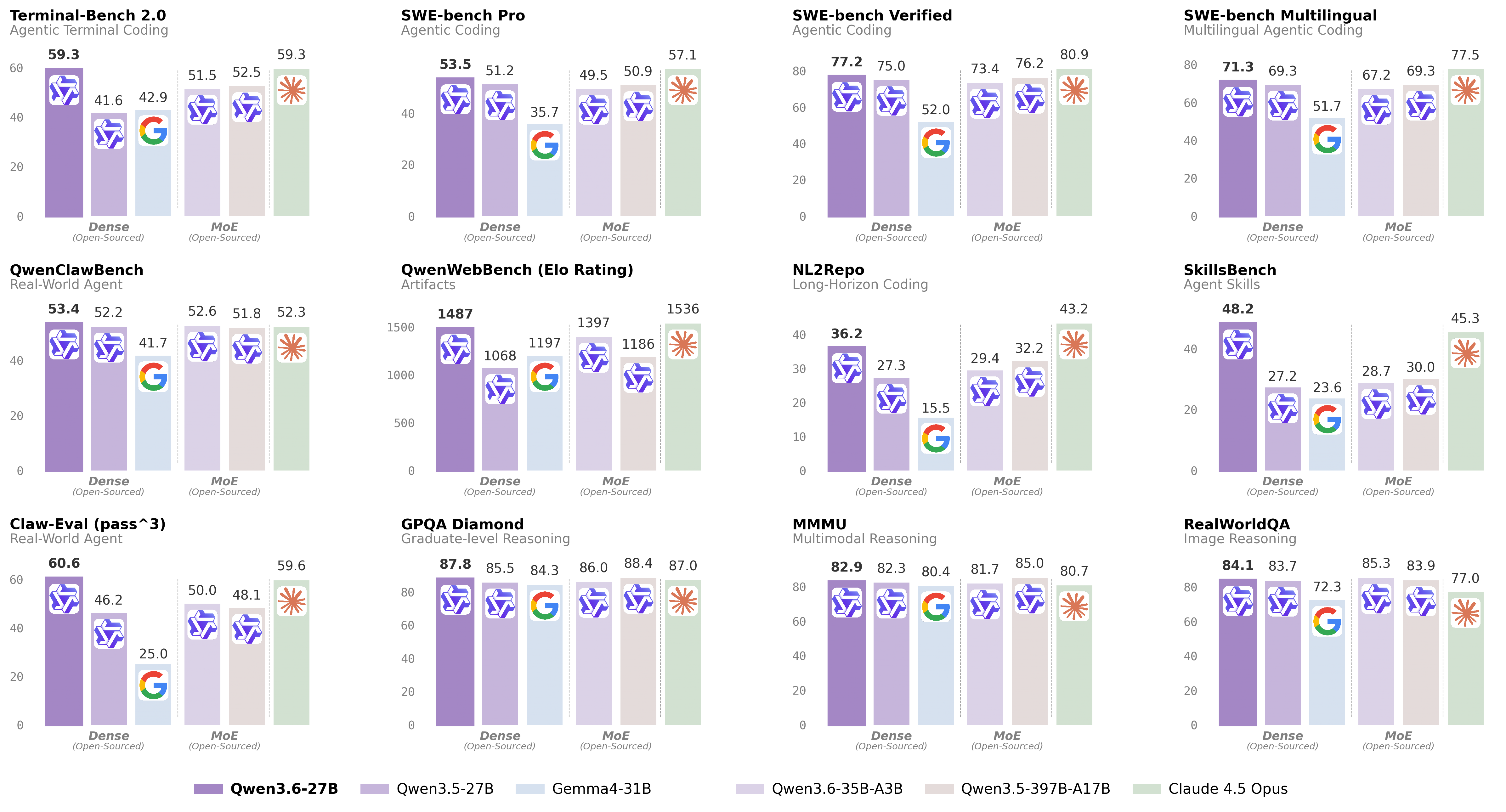
更多详情请参阅我们的博客文章 Qwen3.6-27B。
模型概览
- 类型:带 Vision Encoder 的 Causal Language Model
- 训练阶段:Pre-training 与 Post-training
- Language Model
- 参数量:27B
- Hidden Dimension:5120
- Token Embedding:248320(Padded)
- 层数:64
- Hidden Layout:16 × (3 × (Gated DeltaNet → FFN) → 1 × (Gated Attention → FFN))
- Gated DeltaNet:
- Linear Attention Heads 数量:V 为 48,QK 为 16
- Head Dimension:128
- Gated Attention:
- Attention Heads 数量:Q 为 24,KV 为 4
- Head Dimension:256
- Rotary Position Embedding Dimension:64
- Feed Forward Network:
- Intermediate Dimension:17408
- LM Output:248320(Padded)
- MTP:使用 multi-steps 训练
- Context Length:原生支持 262,144,并可扩展至 1,010,000 tokens。
Benchmark 结果
Language
Vision Language
Quickstart
为便于集成,我们建议通过 API 使用 Qwen3.6。下面是通过 OpenAI-compatible API 使用 Qwen3.6 的指南。
Serving Qwen3.6
Qwen3.6 可以通过流行的 inference frameworks 以 API 形式提供服务。 下面展示为 Qwen3.6 模型启动 OpenAI-Compatible API servers 的示例命令。
[!Important] 不同 framework 的 inference 效率和吞吐量差异很大。 我们建议使用最新版本的 framework,以确保最佳性能和兼容性。 对于生产工作负载或高吞吐场景,强烈建议使用 SGLang、KTransformers 或 vLLM 等专用 serving engines。
[!Important] 该模型默认 context length 为 262,144 tokens。 如果遇到 out-of-memory(OOM)错误,可考虑缩小 context window。 不过,由于 Qwen3.6 会利用扩展 context 处理复杂任务,我们建议保持至少 128K tokens 的 context length,以保留 thinking capabilities。
SGLang
SGLang 是一个面向大语言模型和 vision language models 的快速 serving framework。
建议 Qwen3.6 使用 sglang>=0.5.10,可在全新环境中使用以下命令安装:
uv pip install sglang[all]
更多详情见其文档。
以下命令将在 http://localhost:8000/v1 创建 API endpoints:
标准版本:以下命令可使用 8 张 GPU 上的 tensor parallel,创建最大 context length 为 262,144 tokens 的 API endpoint。
python -m sglang.launch_server --model-path Qwen/Qwen3.6-27B-FP8 --port 8000 --tp-size 8 --mem-fraction-static 0.8 --context-length 262144 --reasoning-parser qwen3Tool Use:若要支持 tool use,可使用以下命令。
python -m sglang.launch_server --model-path Qwen/Qwen3.6-27B-FP8 --port 8000 --tp-size 8 --mem-fraction-static 0.8 --context-length 262144 --reasoning-parser qwen3 --tool-call-parser qwen3_coderMulti-Token Prediction(MTP):建议 MTP 使用以下命令:
python -m sglang.launch_server --model-path Qwen/Qwen3.6-27B-FP8 --port 8000 --tp-size 8 --mem-fraction-static 0.8 --context-length 262144 --reasoning-parser qwen3 --speculative-algo NEXTN --speculative-num-steps 3 --speculative-eagle-topk 1 --speculative-num-draft-tokens 4
详细部署指南见 SGLang Qwen3.5 Cookbook。
vLLM
vLLM 是面向 LLMs 的高吞吐、内存高效 inference 和 serving engine。
建议 Qwen3.6 使用 vllm>=0.19.0,可在全新环境中使用以下命令安装:
uv pip install vllm --torch-backend=auto
更多详情见其文档。
以下命令将在 http://localhost:8000/v1 创建 API endpoints:
标准版本:以下命令可使用 8 张 GPU 上的 tensor parallel,创建最大 context length 为 262,144 tokens 的 API endpoint。
vllm serve Qwen/Qwen3.6-27B-FP8 --port 8000 --tensor-parallel-size 8 --max-model-len 262144 --reasoning-parser qwen3Tool Call:若要支持 tool use,可使用以下命令。
vllm serve Qwen/Qwen3.6-27B-FP8 --port 8000 --tensor-parallel-size 8 --max-model-len 262144 --reasoning-parser qwen3 --enable-auto-tool-choice --tool-call-parser qwen3_coderMulti-Token Prediction(MTP):建议 MTP 使用以下命令:
vllm serve Qwen/Qwen3.6-27B-FP8 --port 8000 --tensor-parallel-size 8 --max-model-len 262144 --reasoning-parser qwen3 --speculative-config '{"method":"qwen3_next_mtp","num_speculative_tokens":2}'Text-Only:以下命令会跳过 vision encoder 和 multimodal profiling,从而释放内存用于额外的 KV cache:
vllm serve Qwen/Qwen3.6-27B-FP8 --port 8000 --tensor-parallel-size 8 --max-model-len 262144 --reasoning-parser qwen3 --language-model-only
详细部署指南见 vLLM Qwen3.5 Recipe。
KTransformers
KTransformers 是一个灵活的 framework,可通过 CPU-GPU 异构计算体验前沿 LLM inference 优化。 若要使用 KTransformers 运行 Qwen3.6,请参阅 KTransformers Deployment Guide。
Hugging Face Transformers
Hugging Face Transformers 包含一个 lightweight server,可用于快速测试和中等负载部署。
Qwen3.6 需要最新的 transformers:
pip install "transformers[serving]"
更多详情见其文档。另请确保已安装 torchvision 和 pillow。
随后运行 transformers serve,在 http://localhost:8000/v1 启动带 API endpoints 的 server;如有可用 accelerator,它会将模型放置到 accelerator 上:
transformers serve Qwen/Qwen3.6-27B-FP8 --port 8000 --continuous-batching
通过 Chat Completions API 使用 Qwen3.6
chat completions API 可通过标准 HTTP requests 或 OpenAI SDKs 访问。 这里展示使用 OpenAI Python SDK 的示例。
开始前,请确保已安装,并配置了 API key 和 API base URL,例如:
pip install -U openai

# Set the following accordingly
export OPENAI_BASE_URL="http://localhost:8000/v1"
export OPENAI_API_KEY="EMPTY"
[!Tip] 我们建议生成时使用以下 sampling parameters:
- 通用任务的 thinking mode:
temperature=1.0, top_p=0.95, top_k=20, min_p=0.0, presence_penalty=0.0, repetition_penalty=1.0- 精确 coding 任务(如 WebDev)的 thinking mode:
temperature=0.6, top_p=0.95, top_k=20, min_p=0.0, presence_penalty=0.0, repetition_penalty=1.0- Instruct(或 non-thinking)mode:
temperature=0.7, top_p=0.80, top_k=20, min_p=0.0, presence_penalty=1.5, repetition_penalty=1.0请注意,不同 inference frameworks 对 sampling parameters 的支持不同。
[!Important] Qwen3.6 模型默认以 thinking mode 运行,会在生成最终回答前生成由
<think>\n...</think>\n\n标记的 thinking content。 若要禁用 thinking content 并获得直接回答,请参考这里的示例。
Text-Only Input
from openai import OpenAI
# Configured by environment variables
client = OpenAI()

messages = [
    {"role": "user", "content": "Type \"I love Qwen3.6\" backwards"},
]

chat_response = client.chat.completions.create(
    model="Qwen/Qwen3.6-27B-FP8",
    messages=messages,
    max_tokens=81920,
    temperature=1.0,
    top_p=0.95,
    presence_penalty=0.0,
    extra_body={
        "top_k": 20,
    },
)
print("Chat response:", chat_response)
Image Input
from openai import OpenAI
# Configured by environment variables
client = OpenAI()

messages = [
    {
        "role": "user",
        "content": [
            {
                "type": "image_url",
                "image_url": {
                    "url": "https://qianwen-res.oss-accelerate.aliyuncs.com/Qwen3.5/demo/CI_Demo/mathv-1327.jpg"
                }
            },
            {
                "type": "text",
                "text": "The centres of the four illustrated circles are in the corners of the square. The two big circles touch each other and also the two little circles. With which factor do you have to multiply the radii of the little circles to obtain the radius of the big circles?\nChoices:\n(A) $\\frac{2}{9}$\n(B) $\\sqrt{5}$\n(C) $0.8 \\cdot \\pi$\n(D) 2.5\n(E) $1+\\sqrt{2}$"
            }
        ]
    }
]

chat_response = client.chat.completions.create(
    model="Qwen/Qwen3.6-27B-FP8",
    messages=messages,
    max_tokens=81920,
    temperature=1.0,
    top_p=0.95,
    presence_penalty=0.0,
    extra_body={
        "top_k": 20,
    },
)
print("Chat response:", chat_response)
Video Input
from openai import OpenAI
# Configured by environment variables
client = OpenAI()

messages = [
    {
        "role": "user",
        "content": [
            {
                "type": "video_url",
                "video_url": {
                    "url": "https://qianwen-res.oss-accelerate.aliyuncs.com/Qwen3.5/demo/video/N1cdUjctpG8.mp4"
                }
            },
            {
                "type": "text",
                "text": "How many porcelain jars were discovered in the niches located in the primary chamber of the tomb?"
            }
        ]
    }
]

# When vLLM is launched with `--media-io-kwargs '{"video": {"num_frames": -1}}'`,
# video frame sampling can be configured via `extra_body` (e.g., by setting `fps`).
# This feature is currently supported only in vLLM.
#
# By default, `fps=2` and `do_sample_frames=True`.
# With `do_sample_frames=True`, you can customize the `fps` value to set your desired video sampling rate.
chat_response = client.chat.completions.create(
    model="Qwen/Qwen3.6-27B-FP8",
    messages=messages,
    max_tokens=81920,
    temperature=1.0,
    top_p=0.95,
    presence_penalty=0.0,
    extra_body={
        "top_k": 20,
        "mm_processor_kwargs": {"fps": 2, "do_sample_frames": True},
    },
)

print("Chat response:", chat_response)
Instruct(或 Non-Thinking)Mode
[!Important] Qwen3.6 不正式支持 Qwen3 的软切换,即
/think和/nothink。
Qwen3.6 默认会先 think 再回答。 你可以通过配置 API parameters,让模型不进行 thinking 而直接回答。 例如:
from openai import OpenAI
# Configured by environment variables
client = OpenAI()

messages = [
    {
        "role": "user",
        "content": [
            {
                "type": "image_url",
                "image_url": {
                    "url": "https://qianwen-res.oss-accelerate.aliyuncs.com/Qwen3.6/demo/RealWorld/RealWorld-04.png"
                }
            },
            {
                "type": "text",
                "text": "Where is this?"
            }
        ]
    }
]

chat_response = client.chat.completions.create(
    model="Qwen/Qwen3.6-27B-FP8",
    messages=messages,
    max_tokens=32768,
    temperature=0.7,
    top_p=0.8,
    presence_penalty=1.5,
    extra_body={
        "top_k": 20,
        "chat_template_kwargs": {"enable_thinking": False},
    },
)
print("Chat response:", chat_response)
[!Note] 如果你使用的是 Alibaba Cloud Model Studio 的 API,除修改
model外,请使用"enable_thinking": False,而不是"chat_template_kwargs": {"enable_thinking": False}。
Preserve Thinking
默认情况下,只会保留处理最新用户消息时生成的 thinking blocks,从而形成通常称为 interleaved thinking 的模式。
Qwen3.6 经过额外训练,能够保留并利用历史消息中的 thinking traces。
你可以通过设置 preserve_thinking 选项启用这一行为:
from openai import OpenAI
# Configured by environment variables
client = OpenAI()

messages = [...]

chat_response = client.chat.completions.create(
    model="Qwen/Qwen3.6-27B-FP8",
    messages=messages,
    max_tokens=32768,
    temperature=0.6,
    top_p=0.95,
    presence_penalty=0.0,
    extra_body={
        "top_k": 20,
        "chat_template_kwargs": {"preserve_thinking": True},
    },
)
print("Chat response:", chat_response)
[!Note] 如果你使用的是 Alibaba Cloud Model Studio 的 API,除修改
model外,请使用"preserve_thinking": True,而不是"chat_template_kwargs": {"preserve_thinking": False}。
这一能力尤其适用于 agent 场景:保留完整 reasoning context 可以提升决策一致性,并且在许多情况下通过减少重复 reasoning 降低整体 token 消耗。此外,它还可以改善 KV cache 利用率,从而优化 thinking 和 non-thinking 两种模式下的 inference 效率。
Agentic Usage
Qwen3.6 在 tool calling 能力方面表现突出。
Qwen-Agent
我们建议使用 Qwen-Agent 快速构建基于 Qwen3.6 的 Agent 应用。
定义可用工具时,你可以使用 MCP 配置文件、使用 Qwen-Agent 的集成工具,或自行集成其他工具。
import os
from qwen_agent.agents import Assistant

# Define LLM
# Using Alibaba Cloud Model Studio
llm_cfg = {
    # Use the OpenAI-compatible model service provided by DashScope:
    'model': 'qwen3.6-27b',
    'model_type': 'qwenvl_oai',
    'model_server': 'https://dashscope.aliyuncs.com/compatible-mode/v1',
    'api_key': os.getenv('DASHSCOPE_API_KEY'),

    'generate_cfg': {
        'use_raw_api': True,
        # When using Dash Scope OAI API, pass the parameter of whether to enable thinking mode in this way
        'extra_body': {
            'enable_thinking': True,
            'preserve_thinking': True,
        },
    },
}

# Using OpenAI-compatible API endpoint.
# functionality of the deployment frameworks and let Qwen-Agent automate the related operations.
#
# llm_cfg = {
#     # Use your own model service compatible with OpenAI API by vLLM/SGLang:
#     'model': 'Qwen/Qwen3.6-27B-FP8',
#     'model_type': 'qwenvl_oai',
#     'model_server': 'http://localhost:8000/v1',  # api_base
#     'api_key': 'EMPTY',
#
#     'generate_cfg': {
#         'use_raw_api': True,
#         # When using vLLM/SGLang OAI API, pass the parameter of whether to enable thinking mode in this way
#         'extra_body': {
#             'chat_template_kwargs': {'enable_thinking': True, 'preserve_thinking': True}
#         },
#     },
# }

# Define Tools
tools = [
    {'mcpServers': {  # You can specify the MCP configuration file
            "filesystem": {
                "command": "npx",
                "args": ["-y", "@modelcontextprotocol/server-filesystem", "/Users/xxxx/Desktop"]
            }
        }
    }
]

# Define Agent
bot = Assistant(llm=llm_cfg, function_list=tools)

# Streaming generation
messages = [{'role': 'user', 'content': 'Help me organize my desktop.'}]
for responses in bot.run(messages=messages):
    pass
print(responses)

# Streaming generation
messages = [{'role': 'user', 'content': 'Develop a dog website and save it on the desktop'}]
for responses in bot.run(messages=messages):
    pass
print(responses)
Qwen Code
Qwen Code 是一个面向 terminal 的开源 AI agent,针对 Qwen models 优化。它可以帮助你理解大型 codebases、自动化繁琐工作,并更快交付。
更多信息请参阅 Qwen Code。
处理超长文本
Qwen3.6 原生支持最高 262,144 tokens 的 context length。 对于总长度(包括输入和输出)超过这一限制的长周期任务,我们建议使用 RoPE scaling 技术有效处理长文本,例如 YaRN。
YaRN 目前受到多个 inference frameworks 支持,例如 transformers、vllm、ktransformers 和 sglang。
一般而言,在受支持的 frameworks 中启用 YaRN 有两种方式:
修改模型配置文件: 在
config.json文件中,将text_config中的rope_parameters字段改为:{ "mrope_interleaved": true, "mrope_section": [ 11, 11, 10 ], "rope_type": "yarn", "rope_theta": 10000000, "partial_rotary_factor": 0.25, "factor": 4.0, "original_max_position_embeddings": 262144, }传入命令行参数:
对于
vllm,可以使用:VLLM_ALLOW_LONG_MAX_MODEL_LEN=1 vllm serve ... --hf-overrides '{"text_config": {"rope_parameters": {"mrope_interleaved": true, "mrope_section": [11, 11, 10], "rope_type": "yarn", "rope_theta": 10000000, "partial_rotary_factor": 0.25, "factor": 4.0, "original_max_position_embeddings": 262144}}}' --max-model-len 1010000对于
sglang和ktransformers,可以使用:SGLANG_ALLOW_OVERWRITE_LONGER_CONTEXT_LEN=1 python -m sglang.launch_server ... --json-model-override-args '{"text_config": {"rope_parameters": {"mrope_interleaved": true, "mrope_section": [11, 11, 10], "rope_type": "yarn", "rope_theta": 10000000, "partial_rotary_factor": 0.25, "factor": 4.0, "original_max_position_embeddings": 262144}}}' --context-length 1010000
[!NOTE] 所有主流开源 frameworks 都实现的是 static YaRN,这意味着 scaling factor 不会随输入长度变化,可能影响短文本上的性能。 我们建议仅在需要处理长 context 时修改
rope_parameters配置。 也建议按需修改factor。例如,如果你的应用典型 context length 为 524,288 tokens,将factor设为 2.0 会更合适。
Best Practices
为获得最佳性能,我们建议采用以下设置:
Sampling Parameters:
- 我们建议根据模式和任务类型使用以下 sampling parameters:
- 通用任务的 thinking mode:
temperature=1.0、top_p=0.95、top_k=20、min_p=0.0、presence_penalty=0.0、repetition_penalty=1.0 - 精确 coding 任务(如 WebDev)的 thinking mode:
temperature=0.6、top_p=0.95、top_k=20、min_p=0.0、presence_penalty=0.0、repetition_penalty=1.0 - Instruct(或 non-thinking)mode:
temperature=0.7、top_p=0.80、top_k=20、min_p=0.0、presence_penalty=1.5、repetition_penalty=1.0
- 通用任务的 thinking mode:
- 对于受支持的 frameworks,你可以在 0 到 2 之间调整
presence_penalty参数,以减少无休止重复。不过,使用较高值有时可能导致语言混杂,并使模型性能略有下降。
- 我们建议根据模式和任务类型使用以下 sampling parameters:
充足的输出长度:对于大多数 queries,我们建议使用 32,768 tokens 的输出长度。对于数学和编程竞赛中的高复杂度问题 benchmark,建议将最大输出长度设为 81,920 tokens。这为模型提供足够空间生成详细、完整的回答,从而提升整体表现。
标准化输出格式:benchmark 时,我们建议使用 prompts 规范模型输出。
- 数学问题:在 prompt 中加入 “Please reason step by step, and put your final answer within \boxed{}.”
- 选择题:在 prompt 中加入以下 JSON 结构以规范回答:“Please show your choice in the
answerfield with only the choice letter, e.g.,"answer": "C".”
长视频理解:为优化纯文本和图像的 inference 效率,发布的
video_preprocessor_config.json中的size参数采用了保守配置。建议将 video_preprocessor_config 文件中的longest_edge参数设置为 469,762,048(对应 224k video tokens),以便对小时级视频启用更高帧率采样,从而获得更好性能。例如:{"longest_edge": 469762048, "shortest_edge": 4096}
Citation
如果你觉得我们的工作有帮助,欢迎引用。
@misc{qwen3.6-27b,
    title  = {{Qwen3.6-27B}: Flagship-Level Coding in a {27B} Dense Model},
    author = {{Qwen Team}},
    month  = {April},
    year   = {2026},
    url    = {https://qwen.ai/blog?id=qwen3.6-27b}
}