@trq212 使用 Claude Code:HTML 的不讲道理的有效性
@trq212 Using Claude Code: The Unreasonable Effectiveness of HTML
文章说明 Claude Code 团队部分成员将 agent 输出从 Markdown 转向 HTML,用 tables、CSS、SVG、JavaScript 等提高信息密度,支持 specs、code review、prototypes、reports 和一次性编辑器;同时提到 HTML 生成耗时约为 Markdown 的 2-4 倍,diff 与 version control 更难处理。
Markdown 已经成为 agents 与我们沟通时使用的主流文件格式。它简单、可移植,具备一定的 rich text 能力,也便于你编辑。Claude 甚至已经相当擅长在 markdown 文件里用 ASCII 画图。
但随着 agents 变得越来越强,我感觉 markdown 已经成了一种受限的格式。我发现超过一百行的 markdown 文件很难读。我想要更丰富的可视化、颜色和图表,也希望能轻松分享它们。
我也越来越少亲自编辑这些文件,而是把它们当作 specs、参考文件、brainstorming 输出等来使用。即使我确实要修改,通常也是 prompt Claude 去改,这就削弱了 markdown 最大的优势之一。
我开始更偏好用 HTML 作为输出格式,而不是 Markdown,也越来越多地看到 Claude Code 团队的其他人这么做。原因如下。
(如果你想先看一些例子,这里有很多:https://thariqs.github.io/html-effectiveness,但记得回来继续读原因)
为什么是 HTML?
信息密度
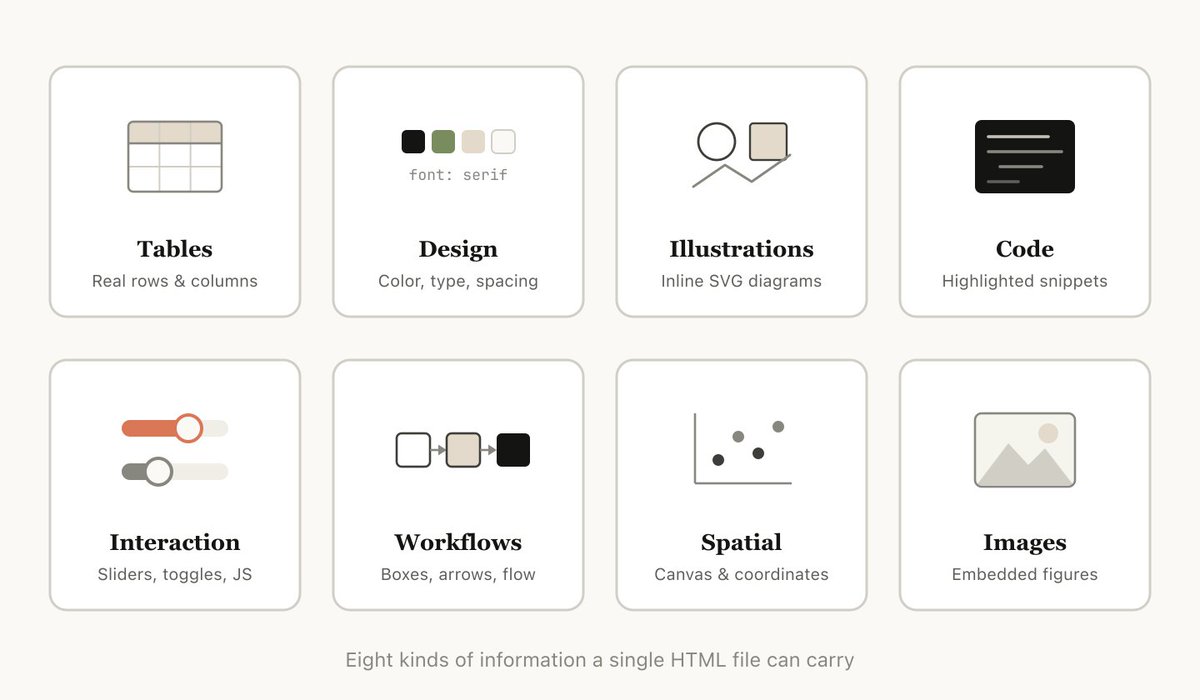
相比 markdown,HTML 能传达丰富得多的信息。它当然可以做简单的文档结构,比如标题和格式,但它也能表示各种其他信息,例如:
- 用 tables 表示表格数据
- 用 CSS 表示 design data
- 用 SVG 表示 illustrations
- 用 script tags 表示 code snippets
- 用 javascript + CSS 配合 HTML elements 实现 interactions
- 用 SVG 和 HTML 表示 workflows
- 用 absolute positions 和 canvases 表示 spatial data
- 用 image tags 表示 images
我甚至会说,几乎不存在 Claude 能读、但你无法用 HTML 相当高效地表示的信息集合。这使它成为一种非常高效的方式:model 可以向你传达深入信息,你也可以审阅它。
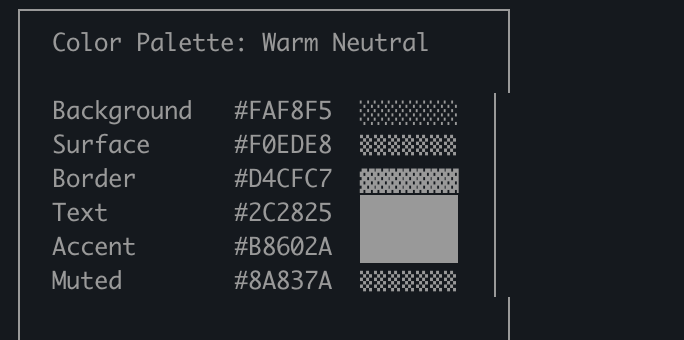
我发现,如果不能这么做,model 可能会在 markdown 里做一些低效得多的事情,比如 ASCII 图;或者我最喜欢的,用 unicode 字符估算颜色,就像这张 Claude Code 截图里一样。
视觉清晰度与阅读便利性
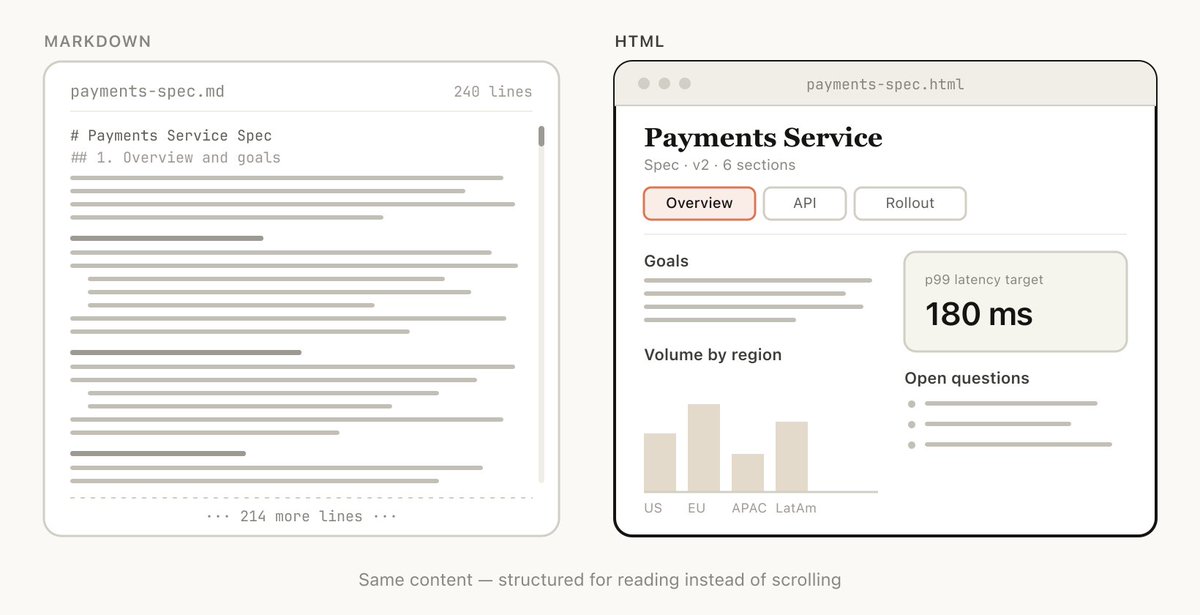
随着 Claude 能做更复杂的工作,它也在写越来越大的 specs 和 plans。实践中,我发现自己通常不会真正读超过 100 行的 markdown 文件,更不用说让我组织里的其他人去读了。
但 HTML 文档容易读得多。Claude 可以用视觉方式组织结构,使其适合用 tabs、illustrations、links 等来导航。它甚至可以做到 mobile responsive,让你根据不同 form factor 用不同方式阅读。
便于分享
Markdown 文件相当难分享,因为大多数浏览器并不能很好地原生渲染它们。你通常必须把它们作为附件加到邮件或消息里。
使用 HTML 时,只要你上传文件(例如到 S3),就可以轻松分享链接。你的同事可以在任何地方打开,并方便地引用。
如果 spec、report 或 PR writeup 是 HTML,别人实际阅读它的概率会高得多。
双向交互
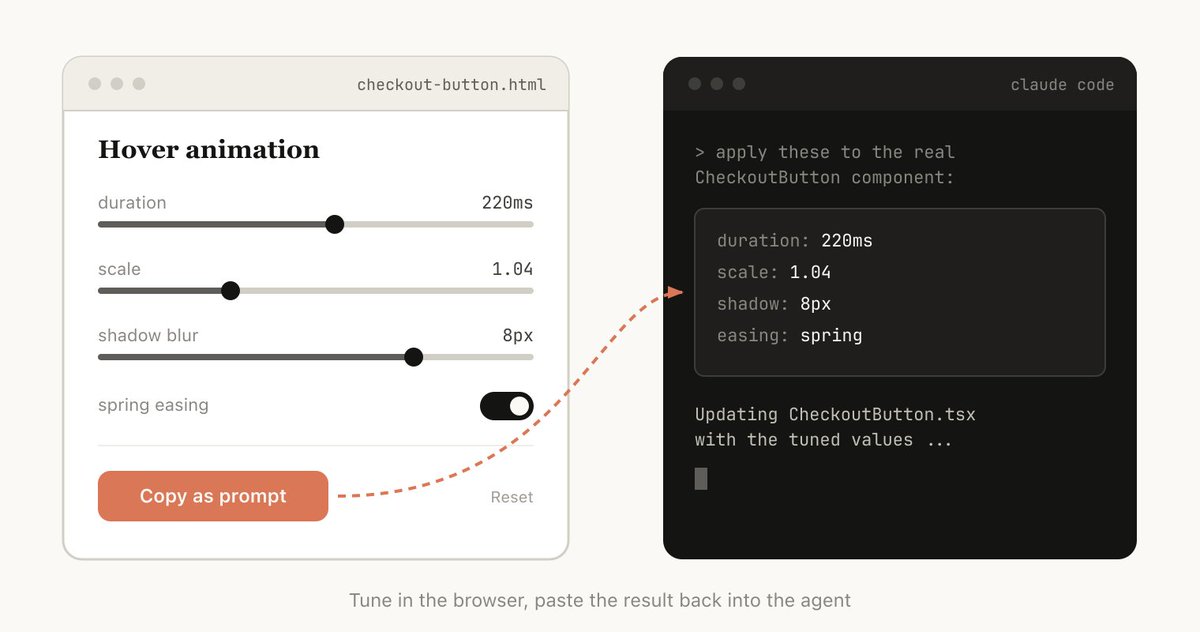
HTML 可以让你与文档交互。例如,你可能希望让它添加 sliders 或 knobs 来调整设计,或者允许你微调算法中的不同选项,看看会发生什么。你也可以让它提供功能,把这些更改复制成 prompt,再粘回 Claude Code。
可以阅读我关于 playgrounds 的帖子,查看这种双向交互的示例:https://x.com/trq212/status/2017024445244924382
数据摄取
为什么用 Claude Code 来做 HTML 文件,而不是比如 ClaudeAI 或 Claude Design?最大的原因之一是 Claude Code 可以摄取的全部 context。
例如,在写这篇文章时,我让 Claude Code 读取我的代码文件夹,找出我生成过的所有 HTML 文件,对它们分组和分类,然后制作一个 HTML 文件,用图表表示每一种类型。你在本文中看到的图表就是直接结果。
除了文件系统,Claude Code 还可以通过你的 MCPs(如 Slack、Linear 等)、你的 web browser(使用 Claude in Chrome)、你的 git history 等找到额外 context。
它很有乐趣
用 Claude 制作 HTML 文档就是更有趣,也让我感觉更参与、更投入到创作中;仅凭这一点就足够了。
如何开始
我有点担心人们读完这篇文章后,会把它做成一个 /html skill 或类似的东西。虽然那可能有一定价值,但我想强调,你不需要做太多就能让 Claude 这么做。你只要让它“make a HTML file”或“make a HTML artifact”就可以。
关键在于知道你希望这个 artifact 做什么,以及你可能如何使用它。随着时间推移,你可能会做一个 skill,但现在我建议先从零开始 prompt,熟悉它在不同场景下的用法。
使用场景
为了让这件事更具体,我为不同用例制作了很多 HTML 文件。你可以在这里查看全部:https://thariqs.github.io/html-effectiveness/,下面是概览。
Specs、Planning 与 Exploration
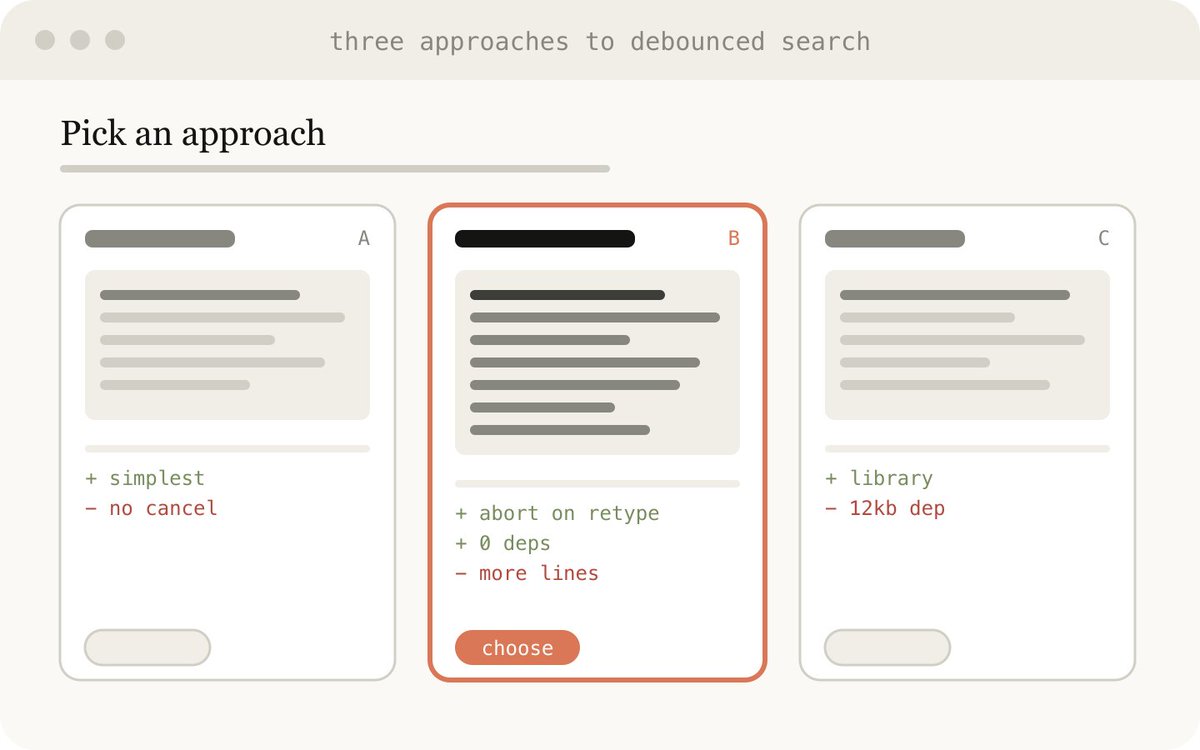
HTML 是 Claude 深入问题的一块丰富画布。当我开始处理一个问题时,我预期的不是做一个简单的 markdown plan,而是做一组互相关联的 HTML 文件。例如,我可能先让 Claude Code brainstorming,并创建一些不同选项的 explorations。然后我会让它进一步展开其中一个,也许做 mockups 或 code snippets。最后,当我感觉不错时,我会让它写一个 implementation plan。对 plan 满意后,我会创建一个新 session,并把这些文件全部传进去让它实现。
在验证时,我也会让 verification agent 读取这些文件,这样它会对所需内容有更广泛的 context。
示例 prompts:
- I'm not sure what direction to take the onboarding screen. Generate 6 distinctly different approaches — vary layout, tone, and density — and lay them out as a single HTML file in a grid so I can compare them side by side. Label each with the tradeoff it's making.
- Create a thorough implementation plan in a HTML file, be sure to make some mockups, show data flow and add important code snippets I might want to review. Make it easy to read and digest.
使用场景:
- 探索在代码中实现某件事的其他方式
- 探索多种 visual designs
Code Review 与 Understanding
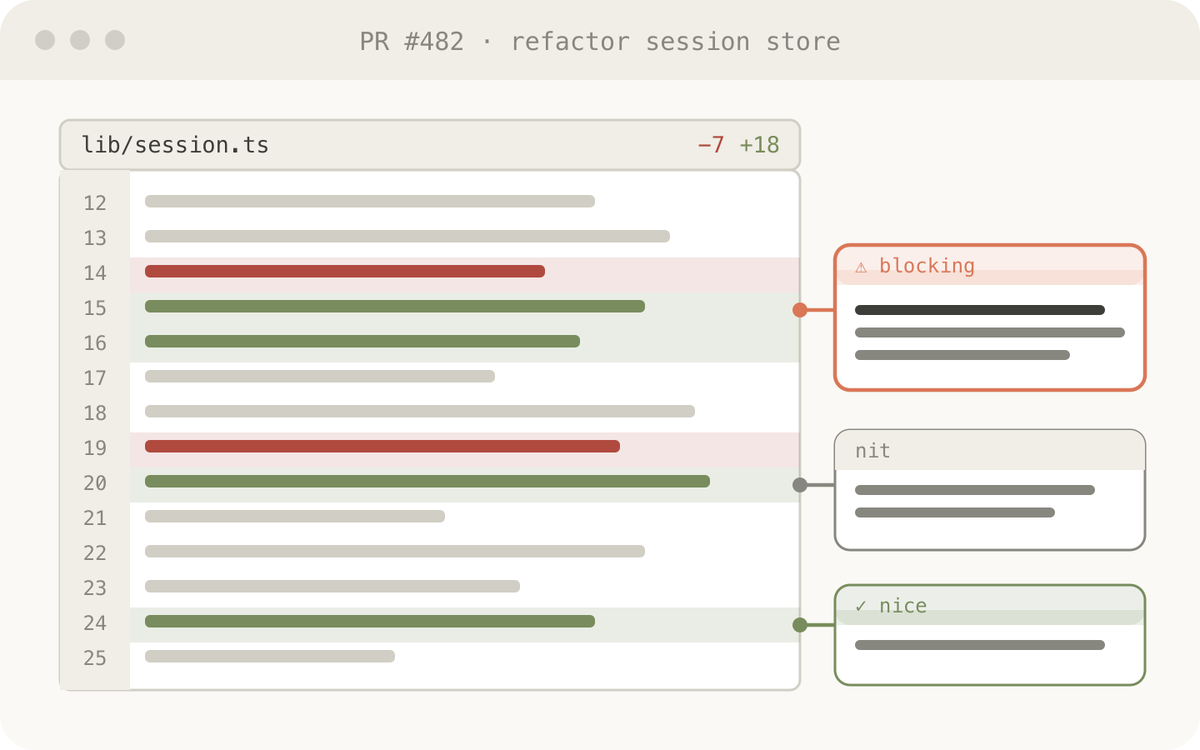
代码在 Markdown 文件里可能很难读。但有了 HTML,我们可以渲染 diffs、annotations、flowcharts、modules 等。可以用它来理解 agent 写的代码、做 code review,或向审阅你代码的人解释一个 PR。我发现这通常比默认的 Github diff view 效果更好,而且我现在每个 PR 都会附上一个 HTML code explainer。
示例 prompt:
Help me review this PR by creating an HTML artifact that describes it. I'm not very familiar with the streaming/backpressure logic so focus on that. Render the actual diff with inline margin annotations, color-code findings by severity and whatever else might be needed to convey the concept well.
使用场景:
- 创建 PR
- 审阅 PR
- 理解代码中的某个主题
Design 与 Prototypes
Claude Design 基于 HTML,因为 HTML 在 design 上表现力很强,即使你的最终界面并不是 HTML。Claude 可以先用 HTML 勾勒设计,然后再用你选择的语言写出来,无论是 React、Swift 等。
你也可以 prototype interactions,例如 animations、actions 等。可以让 Claude 制作 sliders、knobs 等,以精确调出你想要的效果。

示例 prompt:
I want to prototype a new checkout button, when clicked it does a play animation and then turns purple quickly. Create a HTML file with several sliders and options for me to try different options on this animation, give me a copy button to copy the parameters that worked well.
用于:
- 创建 design system artifacts
- 调整 components
- 可视化 component libraries
- Prototyping Joyful Animations
Reports、Research 与 Learning
Claude Code 非常擅长综合多个 data sources 中的信息,并将其转换成可读性强的 report。你可以 prompt Claude 搜索你的 Slack、codebase、git history、互联网等,并用它为你自己、领导层、团队等生成极易阅读的 reports。
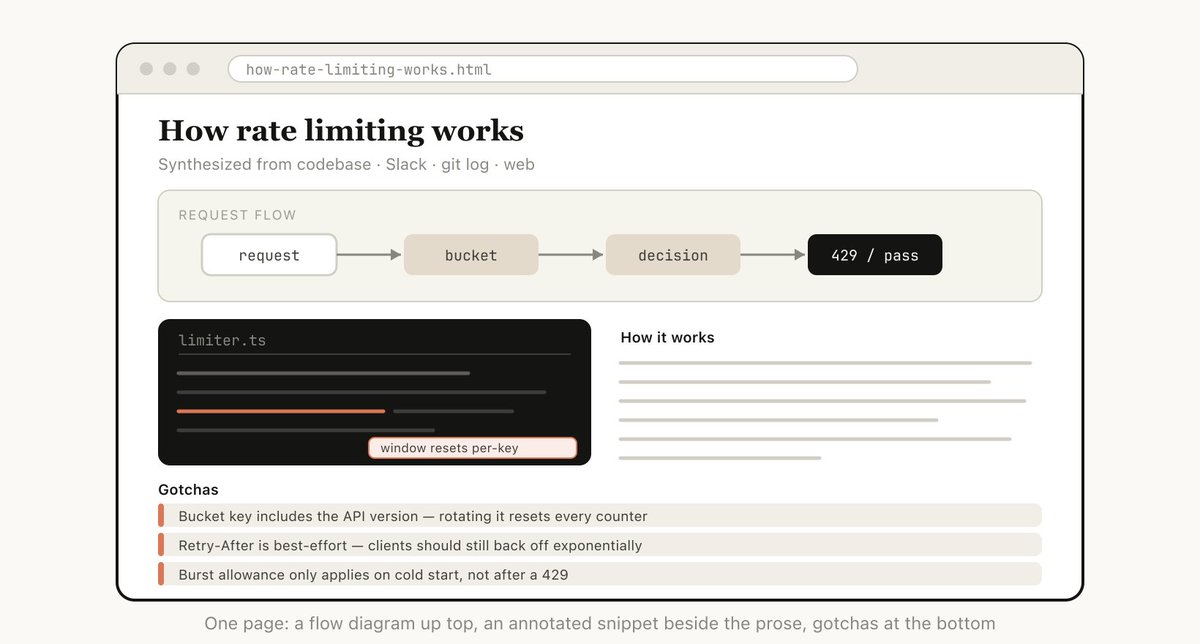
你可以把它组织成长 HTML 文档、interactive explainer,甚至 slideshow/deck。可以让 Claude 使用 SVG 做 diagrams,帮助可视化。
例如,在我关于 prompt caching 的帖子中,我让 Claude 阅读 git history 后,为我准备一个关于我们对 prompt caching 所有改动的深入 research file,用 HTML 供我阅读。
示例 prompt:
I don't understand how our rate limiter actually works. Read the relevant code and produce a single HTML explainer page: a diagram of the token-bucket flow, the 3–4 key code snippets annotated, and a "gotchas" section at the bottom. Optimize it for someone reading it once.
用于:
- 总结某个 feature 的工作方式
- 向我解释一个 concept
- 给老板的 weekly status reports
- 给领导层的 incident reports
- SVG illustrations、flowcharts、technical diagrams 等
Custom Editing Interfaces
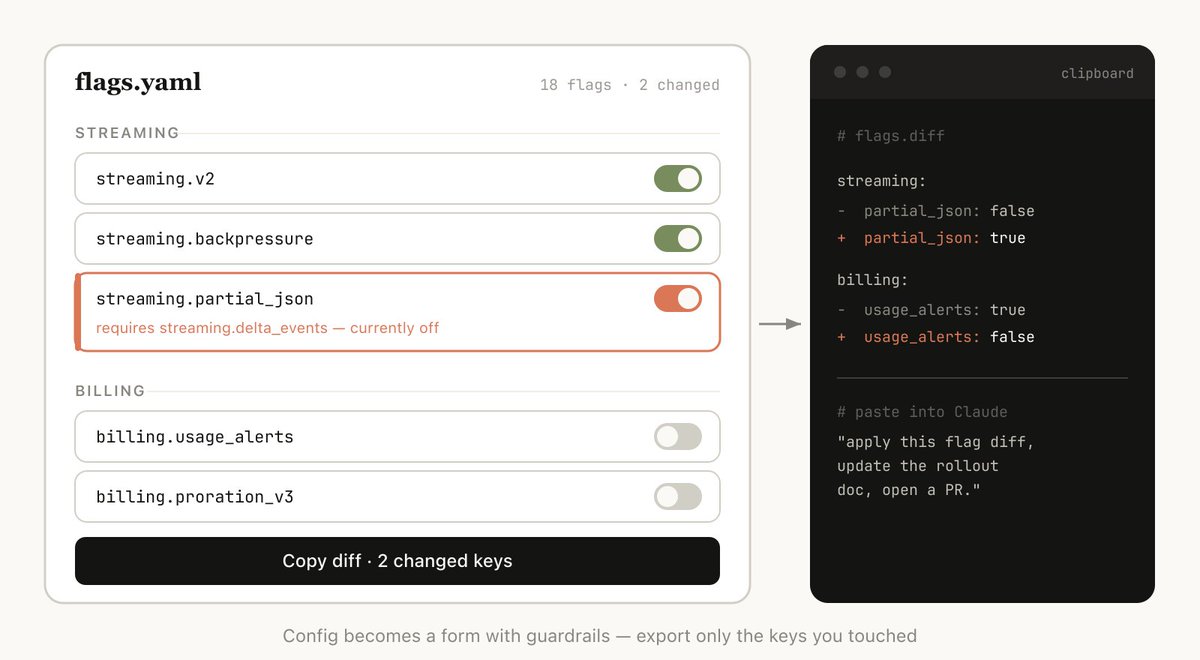
有时,很难只在文本框里描述你想要什么。在这种情况下,我会让 Claude 为我构建一个一次性的 editor,专门服务于我正在处理的这件事。它不是产品,也不是可复用工具,而是一个单独的 HTML 文件,专为这份数据而建。
关键总是以 export 结束:一个 "copy as JSON" 或 "copy as prompt" 按钮,把我在 UI 里做的任何操作转回可以粘贴到 Claude Code 里的东西。
示例 prompts:
- I need to reprioritize these 30 Linear tickets. Make me an HTML file with each ticket as a draggable card across Now / Next / Later / Cut columns. Pre-sort them by your best guess. Add a "copy as markdown" button that exports the final ordering with a one-line rationale per bucket.
- Here's our feature flag config. Build a form-based editor for it, group flags by area, show dependencies between them, warn me if I enable a flag whose prerequisite is off. Add a "copy diff" button that gives me just the changed keys.
- I'm tuning this system prompt. Make a side-by-side editor: editable prompt on the left with the variable slots highlighted, three sample inputs on the right that re-render the filled template live. Add a character/token counter and a copy button.
用于:
- 对任何东西重新排序、triage 或分桶(tickets、test cases、feedback)
- 编辑 structured config(feature flags、env vars、带约束的 JSON/YAML)
- 调优 prompts、templates 或 copy,并实时预览
- 策划 datasets,approve/reject rows,标注 examples,export selection
- 标注 document、transcript 或 diff,并 export annotations
- 选择那些用文字表达很痛苦的值:colors、easing curves、crop regions、cron schedules、regexes。
常见问题
我一直在告诉很多人我是如何转向 HTML 的,也看到了一些反复出现的问题。
它不是更不 token efficient 吗?
虽然 markdown 通常使用更少 tokens,但我发现 HTML 增加的表达力,以及我阅读它的概率高得多,意味着整体输出更好。有了 Opus 4.7 的 1MM context window,增加的 token 使用量在 context window 里并不明显。
现在你什么时候用 markdown?
老实说,我几乎已经完全不再用 markdown 做任何事了,但我可能处在 HTML maximalist 那一端。
我怎么查看 HTML 文件?
我通常只是本地用浏览器打开它(你可以让 Claude 打开),如果想要可分享链接,就上传到 S3。
这不会比 markdown 生成得更久吗?
确实会更久!HTML 可能比 Markdown 多花 2-4 倍时间,但我发现结果值得。
version control 怎么办?
老实说,这是 HTML 最大的缺点之一。相比 Markdown,HTML diffs 噪声多,也更难 review。
我如何让 Claude 符合我的品味 / 不要做得难看?
frontend design plugin 能帮助 Claude 做出不错的 HTML 文件。但如果要匹配你自己公司的风格,你可以让 Claude 指向你的 codebase,创建一个单独的 design system HTML 文件。之后你可以把那个 design system 文件作为其他 html 文件的参考。
Stay in the Loop
以上所有内容是想说明,我认为自己使用 HTML 的真正原因,是我感觉自己与 Claude 的工作过程更保持同步。我曾经开始担心,因为我已经不再深入阅读 plans,我就只能让 Claude 自己做选择。
但我很高兴地说,使用 HTML 之后,我反而比以往任何时候都更能跟上 Claude 的工作过程。希望你也是。